Sentinel简介
一、简介
1、概述
Sentinel是面向分布式、多语言异构化服务架构的流量治理组件,主要以流量为切入点,从流量路由、流量控制、流量整形、熔断降级、系统自适应过载保护、热点流量防护等多个维度来保障微服务的稳定性。
2、基本概念
- 资源
资源是Sentinel的关键概念,只要通过Sentinel API定义的代码就是资源;它可以是Java应用程序中的任何内容,例如:由应用程序提供的服务或一段代码。
- 规则
围绕资源的实时状态设定的规则,包括流量控制规则、熔断降级规则以及系统保护规则;所有规则都可以动态实时调整。
3、主要功能
- 流量控制
任意时间到达服务器的请求往往是随机不可控的,而服务器的处理能力是有限的,因此需要根据系统的处理能力对流量进行控制。
流量控制有以下几个角度:资源的调用关系、运行指标(QPS、线程池、系统负载等)、控制的效果(直接限流、冷启动、排队等)。
- 熔断降级
由于调用关系的复杂性,如果调用链路中的某个资源出现了不稳定状态,最终会导致请求发生堆积。例如:出现超时或异常比例升高的时候,需要对这个资源的调用进行限制,让请求快速失败,避免影响到其它资源导致最终产生雪崩的效果。
- 系统负载保护
当系统负载较高的时候,如果还持续让请求进入,可能会导致系统崩溃,无法响应。
在集群环境下,网络负载均衡会把本应这台机器承载的流量转发到其它的机器上去;如果这个时候其它的机器也处在一个边缘的状态,增加的流量就会导致这台机器也崩溃,从而导致整个集群不可用。
针对这种情况,Sentinel提供了对应的保护机制,让系统的入口流量和系统的负载达到一个平衡,保证系统在能力范围之内处理最多的请求。
二、Sentinel控制台
1、简介
Sentinel提供了一个轻量级的开源控制台,提供机器发现以及健康状况管理、监控(单机和集群)、规则管理和推送等功能。
2、安装启动
- 下载
在Release页面下载控制台jar包
- 启动
java -Dserver.port=8888 -Dcsp.sentinel.dashboard.server=localhost:8888 -Dproject.name=sentinel-dashboard -jar sentinel-dashboard-1.8.6.jar
访问:http://localhost:8888/,需要先登录,默认用户名和密码都是sentinel,可以在启动时指定。
#指定控制台的登录用户名
-Dsentinel.dashboard.auth.username=sentinel

#指定控制台的登录密码
-Dsentinel.dashboard.auth.password=123456

#指定Spring Boot服务端session的过期时间,默认30分钟
-Dserver.servlet.session.timeout=7200
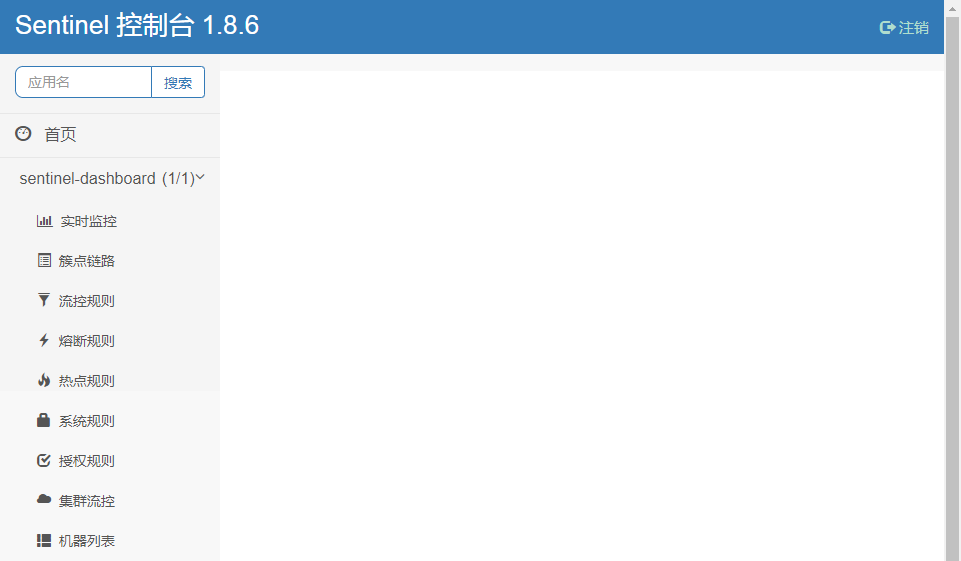
登录之后即可进入控制台首页:
三、样例
1、Hello World
pom.xml
<dependencies>
	<dependency>
		<groupId>com.alibaba.csp</groupId>
		<artifactId>sentinel-core</artifactId>
		<version>1.8.6</version>
	</dependency>

	<dependency>
		<groupId>com.alibaba.csp</groupId>
		<artifactId>sentinel-transport-simple-http</artifactId>
		<version>1.8.6</version>
	</dependency>

	<dependency>
		<groupId>ch.qos.logback</groupId>
		<artifactId>logback-classic</artifactId>
		<version>1.2.13</version>
	</dependency>
</dependencies>
- 主程序
public class App {

	public static void main(String[] args) {

		Logger log = LoggerFactory.getLogger(App.class);

		initFlowRules();

		Calendar cal = Calendar.getInstance();
		cal.add(Calendar.SECOND, 30);
		long time = cal.getTimeInMillis();
		while(true) {

			try(Entry entry = SphU.entry("HelloWorld")){
				log.info("Hello World");
			} catch (BlockException e) {
				//log.error("blocked!");
			}

			if(System.currentTimeMillis() > time) {
				break;
			}
		}

	}


	private static void initFlowRules() {
		List<FlowRule> rules = new ArrayList<>();
		FlowRule rule = new FlowRule();
		rule.setResource("HelloWorld");
		rule.setGrade(RuleConstant.FLOW_GRADE_QPS);
		rule.setCount(2);
		rules.add(rule);
		FlowRuleManager.loadRules(rules);
	}
}
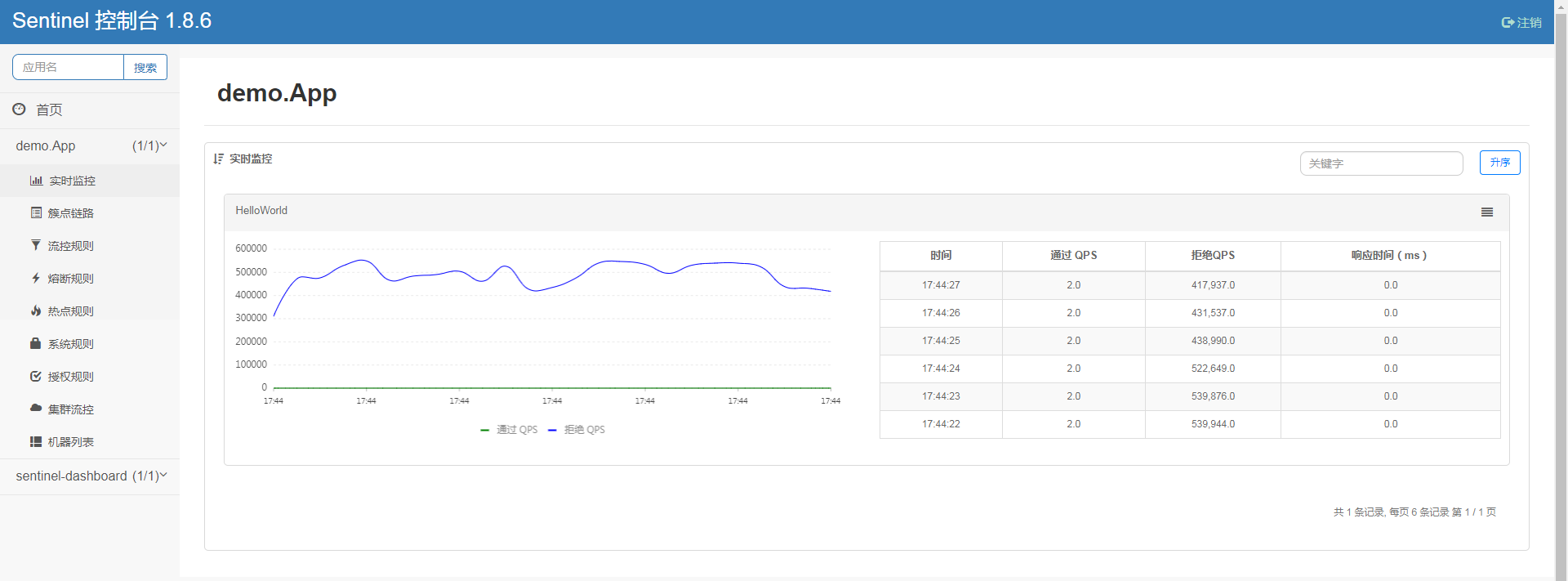
其中log.info("Hello World");为被保护的逻辑,设置的规则为每秒最多通过2个请求。
- 运行
运行后可以在控制台看到每秒输出2次Hello World:
17:44:02.558 [main] INFO  demo.App - Hello World
17:44:02.564 [main] INFO  demo.App - Hello World
17:44:03.500 [main] INFO  demo.App - Hello World
17:44:03.500 [main] INFO  demo.App - Hello World
17:44:04.500 [main] INFO  demo.App - Hello World
17:44:04.500 [main] INFO  demo.App - Hello World
17:44:05.500 [main] INFO  demo.App - Hello World
17:44:05.500 [main] INFO  demo.App - Hello World
17:44:06.500 [main] INFO  demo.App - Hello World
17:44:06.500 [main] INFO  demo.App - Hello World
在Sentinel控制台也可以监控实时流量:
2、Web样例
pom.xml
<parent>
	<groupId>org.springframework.boot</groupId>
	<artifactId>spring-boot-starter-parent</artifactId>
	<version>2.7.18</version>
	<relativePath /> <!-- lookup parent from repository -->
</parent>

<dependencies>
	<dependency>
		<groupId>org.springframework.boot</groupId>
		<artifactId>spring-boot-starter-web</artifactId>
	</dependency>
	<dependency>
		<groupId>com.alibaba.csp</groupId>
		<artifactId>sentinel-core</artifactId>
		<version>1.8.6</version>
	</dependency>
	<dependency>
		<groupId>com.alibaba.csp</groupId>
		<artifactId>sentinel-annotation-aspectj</artifactId>
		<version>1.8.6</version>
	</dependency>
	<!-- 使用Sentinel控制台需要引入 -->
	<dependency>
		<groupId>com.alibaba.csp</groupId>
		<artifactId>sentinel-transport-simple-http</artifactId>
		<version>1.8.6</version>
	</dependency>
</dependencies>
- 配置类
import java.util.ArrayList;
import java.util.List;

import javax.annotation.PostConstruct;

import org.springframework.context.annotation.Bean;
import org.springframework.context.annotation.Configuration;

import com.alibaba.csp.sentinel.annotation.aspectj.SentinelResourceAspect;
import com.alibaba.csp.sentinel.slots.block.RuleConstant;
import com.alibaba.csp.sentinel.slots.block.flow.FlowRule;
import com.alibaba.csp.sentinel.slots.block.flow.FlowRuleManager;

@Configuration
public class SentinelConfig {

public static final String RESOURCE_KEY = "hello";

    @PostConstruct
    public void initFlowRules() {
        List<FlowRule> rules = new ArrayList<>();
        FlowRule rule = new FlowRule();
        rule.setResource(RESOURCE_KEY);
        rule.setGrade(RuleConstant.FLOW_GRADE_QPS);
		//每秒最多2个请求
        rule.setCount(2);
        rules.add(rule);
        FlowRuleManager.loadRules(rules);
    }

    @Bean
    public SentinelResourceAspect sentinelResourceAspect() {
    	//让@SentinelResource注解生效
        return new SentinelResourceAspect();
    }
}
- 控制器类
import org.springframework.web.bind.annotation.GetMapping;
import org.springframework.web.bind.annotation.RestController;

import com.alibaba.csp.sentinel.annotation.SentinelResource;
import com.alibaba.csp.sentinel.slots.block.BlockException;

@RestController
public class HelloController {

	@GetMapping("/hello")
	@SentinelResource(value = SentinelConfig.RESOURCE_KEY, blockHandler = "blocked")
	public String hello(String name) {
		return "hello " + name;
	}

	public String blocked(String name, BlockException e) {
		//方法签名必须与原方法一致,并多加一个BlockException参数
		return "Traffic throttling, please try again later~";
	}
}
- 主程序
import org.springframework.boot.SpringApplication;
import org.springframework.boot.autoconfigure.SpringBootApplication;

@SpringBootApplication
public class App {

	public static void main(String[] args) {
		//控制台地址,使用Sentinel控制台需要,一般设置在启动参数里
		System.setProperty("csp.sentinel.dashboard.server", "localhost:8888");
		System.setProperty("project.name", "simple-demo");

		SpringApplication.run(App.class, args);
	}
}
- 测试
访问http://localhost:8080/hello?name=jack,手工快速刷新浏览器,可以看到hello jack与Traffic throttling, please try again later~交替出现。
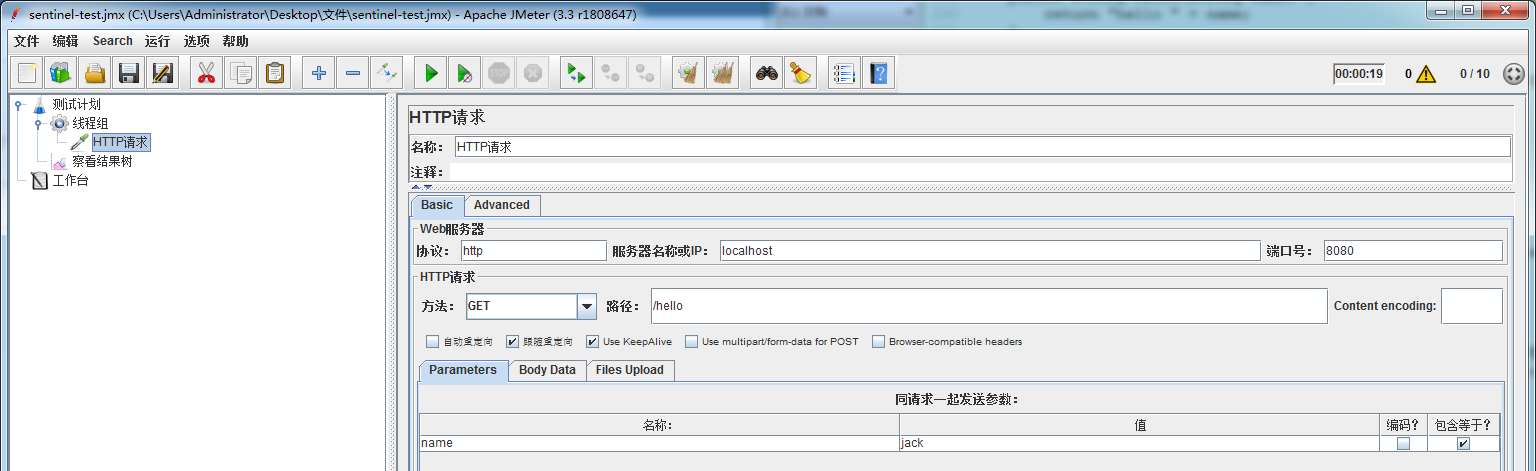
使用JMeter启动10个线程运行20s:
查看Sentinel控制台监控:
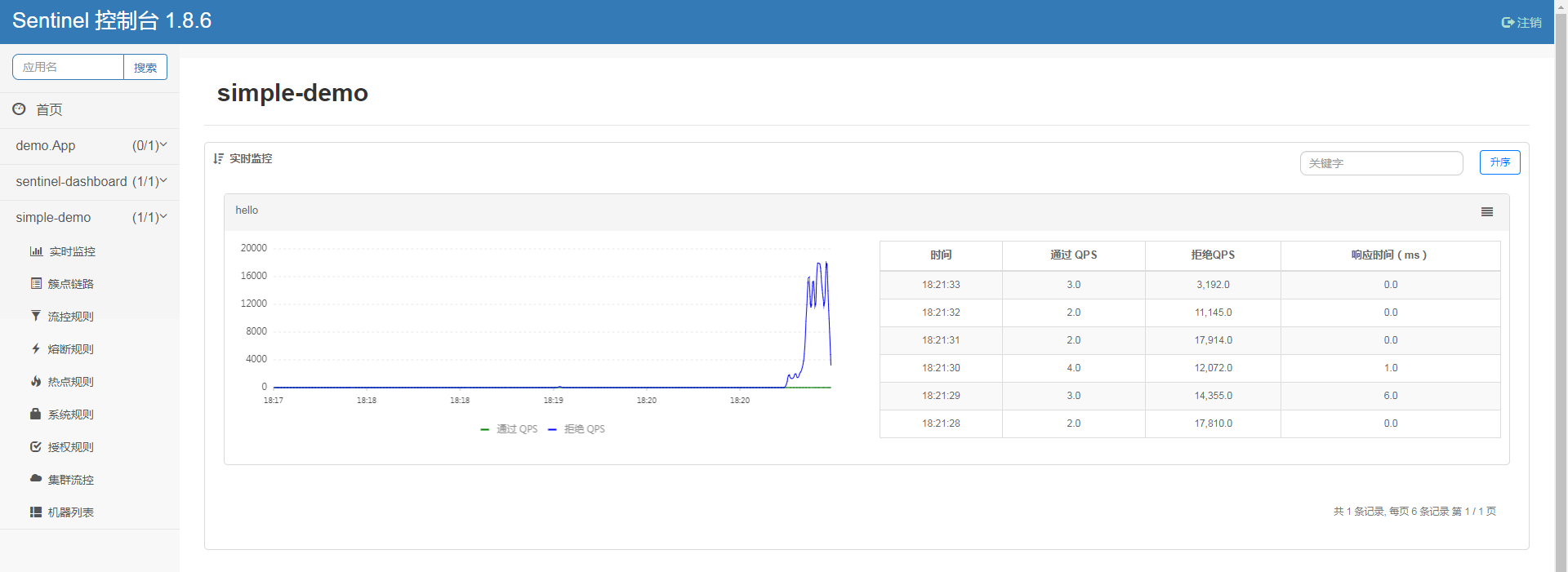
由于Sentinel的”秒级”统计是滑动窗口(1秒被切成2个500 ms的bucket),在JMeter并发测试时可能出现窗口边界附近有大于2 个请求的情况。
例如:
| 时刻(ms) | bucket | 计数 | 窗口总和 |
| 0 | bucket-0 | 1 | 1 |
| 400 | bucket-0 | 2 | 2 |
| 900 | bucket-1 | 1 | 3 |
虽然每个bucket都没超2,但整秒累加得到3,控制台就会显示3.0。